Audio interfaces and mixers: what do you actually need?
You want to record a voice, plug in a guitar, stream a conversation or make an entire band audible. What goes between those sounds and your computer, headphones or speakers? An audio interface and a mixer can both help, but they are designed around different jobs.
KEEP LEARNINGLesson 17 of 27 · Sources, interfaces & digital audio
Example to decode: 1 mic / 2 mic inputs / stereo mix
Start here: An audio interface is usually the bridge between recording equipment and a computer. A mixer lets you control several sounds and decide where they go. Some devices combine both. The important questions are what you need to connect, what you need to record separately, and who needs to hear what.
01 / THE FIRST QUESTION
What is the difference between an audio interface and a mixer?
Imagine two people. One wants to record a vocal into a song on a laptop. The other is running microphones and instruments at a community concert. They may use some of the same sockets and controls, but they aren't trying to do exactly the same thing.
Audio interface
Connect sounds to recording software
An interface accepts signals from microphones or instruments and sends them into a computer as recordings. It usually also plays sound from the computer through headphones or speakers.
Why use it? You want to record cleanly, hear yourself as you work and possibly save each connected source onto its own track.
Not necessarily: A big board of physical sliders or the ability to run a public-address system without a computer.
Audio mixer
Control the balance and destinations of several sounds
A mixer takes different voices and instruments, lets you adjust their individual levels and sends a chosen combination to speakers, headphones, a recorder or another system.
Why use it? You need hands-on control during a rehearsal, presentation, live show, podcast or stream, often with separate sound for the audience and performers.
Not necessarily: A computer connection or a way to record every incoming source separately.
Combination
One box can do both
A USB mixer, recording console, podcast station or audio interface with internal routing can combine parts of both jobs. Some mixers record to a memory card without any computer. Some interfaces allow detailed software mixing without a physical fader board.
Why use it? You need both recording and live control. Check the actual inputs, recording channels and output paths; a label cannot tell the whole story.
Important distinction: You don't automatically need either device just to listen to music. Computers and phones already have audio hardware; USB microphones and some digital instruments can connect directly. These separate boxes become useful when their inputs, controls or monitoring solve a real problem.
02 / FOLLOW THE SOUND
Where does the sound travel?
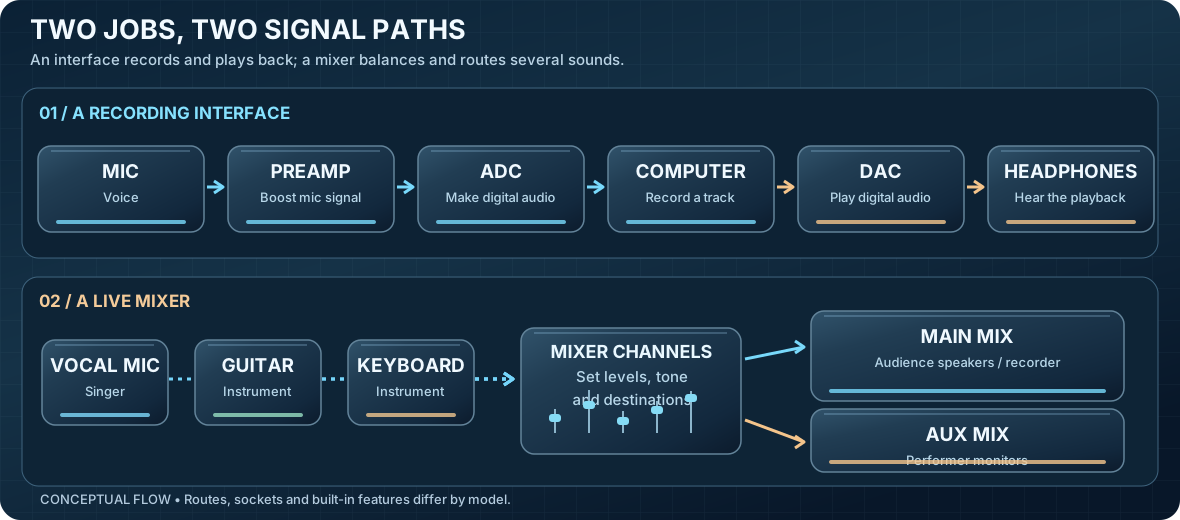
A microphone produces a small electrical signal. The next device needs to turn that into something useful for recording, listening or both. Follow the two routes.
Two typical jobs. An interface often includes the microphone preamp, ADC (recording converter), DAC (playback converter) and headphone amplifier in one box. A mixer can feed main speakers and a separate monitor mix. The simplified drawings are not real equipment schematics and don't imply that a particular device has every shown connection.
The interface path
Microphone → preamp → ADC → recording software. A preamp is the circuit that raises a microphone's tiny signal so it can be used. An ADC (analogue-to-digital converter) turns the changing electrical audio into digital data.
Computer playback → DAC → headphones or speakers. A DAC (digital-to-analogue converter) turns stored digital audio back into an electrical signal. Most interfaces contain both directions.
The mixer path
Voice + guitar + keyboard → individual mixer channels → chosen outputs. A channel is the path and controls for one source. The mixer can send one balance of sounds to the audience and a different balance to the musician's monitor.
Many modern mixers can send audio to a computer too. Whether that means one combined mix or separate tracks is a specification you must check.
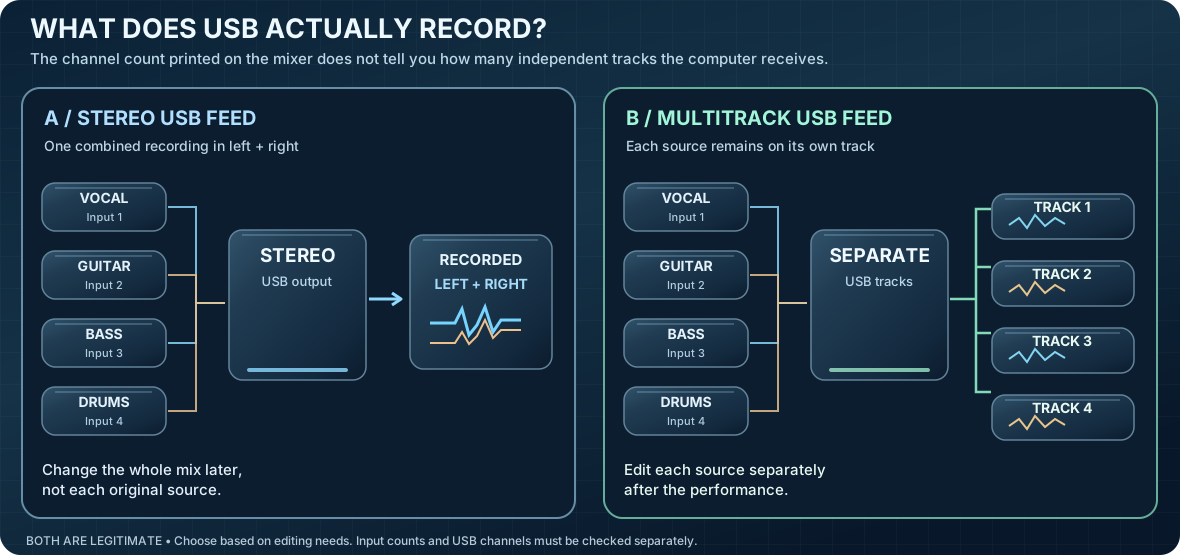
Does the computer receive a stereo mix or separate recordings?
This is where many beginners choose the wrong equipment. A mixer might have ten sound channels to control, yet send only two channels to a computer. Two channels usually means a finished stereo mix: a left channel and a right channel combined from the inputs.
Same four sources, different result. A stereo board recording captures the combined balance. A multitrack recording keeps the sources separate, which lets you change the vocal level or process the bass afterward. The lines are an illustrative routing example, not measurements.
A stereo USB mixer can be exactly what you need
At a live event, you may only want to save what the audience heard or send a finished mix into a stream. A stereo feed is simple and useful. But after recording, you generally can't reach inside that file and independently adjust the singer, guitar or snare like you could with separate original tracks.
A multitrack interface or mixer preserves choices
If four microphones arrive as four separate computer inputs, the recording software can store each one on a separate track. You can then change levels, effects or timing independently. A mixing console is still useful when you also need live hands-on control or several monitor mixes.
A real specification comparison:
Yamaha describes its MG10XU as a 10-channel mixer with a 2-in/2-out USB audio connection. By contrast, Zoom describes its LiveTrak L-12 as a mixer and recorder with a 14-in/4-out USB audio interface. Those numbers describe different capabilities; 14 USB recording channels do not mean fourteen XLR microphone sockets.
These are documented product examples to explain the labels, not recommendations or evidence that one sounds better. Exact configurations and product versions matter.
Ask before buying: “How many sounds can this device record at the same time, onto separate tracks?” Then ask how many of those inputs actually accept microphones. A “10-channel” label and a USB socket do not answer either question.
04 / ON THE MIXING BOARD
What do all those knobs and sliders actually do?
Most mixer controls make more sense if you imagine a single voice coming in and then ask two questions: how should it sound? and who should hear it?
Gain / input trim
Sets how strongly the incoming source is amplified near the beginning of its path. It is not the same thing as making the final audience mix louder. More gain is not automatically better; overloading the input can cause rough, distorted sound.
EQ (tone controls)
Lets you adjust parts of the sound such as bass, middle notes or treble. It is a way of shaping a voice or instrument, not a fix for every microphone position or room problem.
Fader / level slider
Raises or lowers how much of that channel goes into a mix. A guitarist can be turned down in the audience mix without necessarily changing the strength of the original recording input.
Pan / stereo position
Chooses where a sound sits between the left and right sides of a stereo mix. Not every output or live system is stereo; some channels or buses are deliberately mono.
Mute, solo and headphones
Mute silences a chosen route. Solo or PFL can let the operator check an individual channel through the monitor section, depending on the mixer. These buttons behave differently across models.
Aux send / monitor mix
An auxiliary send, usually shortened to aux, is an extra path from one or more channels. It can feed a stage monitor, a performer's headphones or an effects unit without being identical to the audience mix.
Example: a vocalist asks, “Can I hear more of myself?”
The audience already hears the singer clearly. Turning up the singer in the main mix could make the audience balance worse. Instead, the operator raises the singer in the performer's monitor mix, if the mixer has a suitably configured separate aux route.
The two mixes can share the same input, but the destination controls must be available and set correctly. This is why an independent monitor mix can be more useful than yet another advertised effect.
Optional: buses, groups, inserts and effects sends
A bus is a shared path carrying audio from several channels. A group can let you control several sources together, such as a collection of drum microphones. An insert sends a channel through external or internal processing at a specific point in its path. A send/return arrangement can share reverb between several channels. A matrix may combine finished mixes to send different levels to different rooms. These features differ by mixer and are most useful in larger systems; you don't need to memorize them to choose your first interface or mixer.
Some effects change what the performer hears but do not necessarily alter the track being recorded. Whether the recorded feed is taken before or after a fader or effect depends on routing and model settings.
05 / APPLY IT TO YOUR GOAL
What does a rapper need compared with a drummer or full band?
Don't count how many parts are in the finished song. Count how many real sounds you must capture at the same time, and which ones you want to adjust separately later.
A rapper adding vocals to an existing beat
Starting point: Often one good microphone input, a way to hear the beat through headphones and recording software. The beat is already on the computer, so it doesn't need a second physical microphone input. Additional vocal layers can be recorded one after another.
When more gear helps: Multiple performers at once, a hardware drum machine, external effects or independent headphone mixes. A mixer isn't automatically needed for one vocal mic.
A singer-songwriter recording voice and acoustic guitar
Starting point: One mic can capture a complete blended performance. If you want to edit the guitar and singing separately while performing both together, plan for two suitable simultaneous inputs: perhaps one microphone on the voice and one on the guitar, or a mic plus a guitar pickup.
Alternative: Record the guitar first and sing afterward. That can let one input create many separate song tracks over time, though it changes the live-performance feel.
A podcast with several guests
Starting point: Check how many microphones can be connected, whether each voice can be saved separately and whether everyone needs a headphone feed. Four XLR microphone inputs are more relevant than four playback output jacks when four people speak at once.
Alternative: A podcast-focused mixer or station may provide headphone routing, call connections and recording without a laptop, but verify its actual separate-track options.
A drummer recording a real kit
Starting point: A single mic or stereo pair can capture an entire performance, if that's the sound you're after. Multiple close microphones allow more individual control, but every simultaneously recorded microphone usually needs a suitable separate input and track.
Example: A kit recorded with kick, snare, two overheads and two tom microphones needs six suitable simultaneous microphone inputs if all six are to remain independently editable. That's a planning illustration, not the one “correct” way to mic drums.
A full band playing together in a garage
Starting point: Count all the microphones and direct instrument feeds at the same moment. You might have six drum mics, a vocal mic, a guitar cabinet mic and a bass direct input: that's nine separate inputs to record everything independently at once.
What changes: Larger interfaces or multitrack mixers, more cable runs, headphone or stage monitor mixes, and more attention to unwanted sound reaching other microphones. You could record one instrument at a time with fewer inputs if the band prefers overdubbing.
A band playing live or a presenter addressing a room
Starting point: A live mixer becomes important because multiple sources must reach speakers now. Independent aux mixes can help performers. Recording is an additional decision: the main stereo feed may be enough for a record of the show, or you might want separate tracks later.
Important: A conventional mixer's output does not directly power ordinary passive PA speakers. The system needs an appropriate power amplifier or powered speakers; certain special powered mixers contain amplification. See the separate PA speaker explanation.
A livestream that includes a microphone, game audio and remote guests
Starting point: Think about where each sound needs to go. You may want the audience to hear your mic and the game, while you hear a different balance in headphones. Remote guests must not receive their own delayed voices back.
What can help: An interface with suitable software routing, a stream-oriented mixer, or a recording app with carefully configured audio sources. Check the availability and behavior of loopback and separate monitor outputs; don't buy a large console merely for its appearance.
More input channels are not a measure of professionalism. A one-mic recording can be exactly right. Buy more independent inputs when your actual simultaneous recording or routing needs demand them.
06 / HEARING YOURSELF
Why can recording feel delayed, doubled or awkward?
Monitoring means hearing what you're recording while you perform. Sometimes the sound reaches your headphones through the computer, and sometimes the interface sends you the input more directly.
Software monitoring
Microphone→Computer + effects→Headphones
The computer receives the sound, may add effects and sends it back to your ears. This can let you hear the software effects, but the trip takes time and may become distracting if the delay is noticeable.
Direct monitoring
Microphone→Interface monitor route→Headphones
You listen through a local path rather than waiting for the full computer trip. The delay is typically very small, although the path and any internal processing depend on the device. Software-only effects may not be audible on that direct path.
Why do I hear a second, echoing version of myself?
The same microphone may be reaching your headphones twice: once by direct monitoring and again after a delayed trip through the computer. If you're using direct monitoring, check whether the recording software's own input monitoring should be switched off. Do not blindly mute a channel needed for an actual recording or stream.
A buffer is a small chunk of audio the computer keeps ready to process. Smaller buffers can reduce software-monitoring delay but demand more consistent processing from the computer; too small may produce crackles or dropouts. Larger buffers usually make processing easier but can increase the delay you hear. Driver quality, computer performance and interface design matter. See Focusrite's driver and latency explanation for the deeper engineering.
Optional: loopback, mix-minus and separate cue mixes
Loopback routes computer playback back as an input for recording or streaming. It's useful for capturing application audio, but mistakes can create an echo or feedback. A mix-minus sends a remote guest everything they need except their own returning voice. An independent cue mix lets each musician hear an appropriate balance in headphones. Not all hardware supports each arrangement, and some functions are supplied by software rather than the box.
07 / READING THE BACK PANEL
Which sockets and labels matter?
A connector's shape alone isn't enough. Check which kind of signal that specific socket accepts and whether it is available for recording at the same time as the others.
Mic / XLR input
Usually accepts a microphone's small signal and provides a microphone preamp. Many condenser microphones need 48 V phantom power from a suitable input. For microphone connection and power details, see Microphone Types.
Line input
Accepts an already stronger audio signal from equipment such as a keyboard, preamp or mixer. It is not always interchangeable with a microphone or guitar input. Read the input's supported level and mode.
Instrument / Hi-Z
A guitar- or bass-friendly input designed for many passive pickups. Hi-Z means high input impedance, a property that helps avoid loading the pickup inappropriately. Not every quarter-inch socket has this feature.
Combo connector
A single hole that accepts an XLR plug or a quarter-inch plug. These two plug shapes usually select different kinds of signal, but the exact behavior varies. It normally represents one input position, not two simultaneous inputs.
USB / USB-C / computer
Often carries digital audio to and from a computer, sometimes also power and control data. The socket shape doesn't tell you the number of recordable channels, the actual delay, or mobile/driver compatibility.
Monitor / line outputs
Send a playback or mixer signal to powered monitors, an amplifier, external effects or a larger system. An output labelled “3–4” may be a second stereo route, not a second pair of microphone recording inputs.
Headphone outputs
Amplify audio for headphones. Two headphone jacks don't always mean two independently adjustable mixes: the sockets may carry the same signal with one or separate volume controls.
ADAT / S/PDIF digital audio
Digital links that may let the device receive or send additional channels with compatible external equipment. These count in some advertised total I/O figures but aren't automatically built-in analogue microphone sockets.
MIDI input/output
Usually carries note and control instructions from instruments and controllers, not the instrument's recorded sound. A keyboard may need a separate audio connection if you want its own built-in sounds.
Aux send / inserts / FX send
Extra mixer outputs or paths used for performers' monitors, effects or special routing. Confirm whether a given send is before or after the channel fader if the route must remain independent.
For a fuller beginner explanation of the different electrical source levels, see source levels and input sensitivity. The lesson here is about choosing appropriate inputs and routes, not redoing the electrical measurements.
08 / DECODING THE NUMBERS
Which specifications actually matter before you buy?
Start with the requirements that can make equipment usable or unusable. The impressive-looking numbers near the bottom of the specification sheet come later.
Specification
What it tells you
Why you'd care
Simultaneous analogue inputs
How many real microphone, line or instrument signals can enter at once, including how many have mic preamps.
A singer-songwriter may need two. A multi-mic drum kit or band may need many more.
USB recording channels
How many separate sound channels the computer can receive at once.
Determines whether the computer gets independent tracks or just a combined stereo feed.
Playback/output channels
How many separately routed signals the computer or mixer can send outward.
Separate monitors, headphone cue mixes, hardware effects or feeds to other rooms.
Monitoring and routing
Direct monitoring, software mixer, independent aux feeds, loopback, mute and solo behavior.
Useful when performers, audiences and remote guests must hear different things.
Input types / phantom power
Mic vs line vs instrument support, and whether suitable microphone power is provided.
Stops the wrong microphone or guitar from being connected to an unsuitable input.
Computer compatibility
Supported operating systems, drivers, sample-rate modes and computer/phone connections.
A good-sounding interface is no use if it can't run reliably on your machine.
Preamp gain range and input noise
How much a quiet microphone can be boosted, and how much hiss the input electronics add.
May matter for quiet voices or lower-output dynamic/ribbon microphones.
Maximum input level / headroom
How strong a signal the input can take before unwanted overload.
Matters with loud instruments, external preamps and hotter line outputs.
Converter dynamic range / distortion
Published measurements of noise and unwanted signal changes during conversion.
Useful when measured under stated conditions, but rarely the first reason to pick a device.
Bit depth / sample rate
Digital recording format limits, such as 24-bit at 48 kHz or other modes.
Check supported modes and how many channels remain available; these numbers do not guarantee better sound.
Standalone / onboard recording
Whether a device operates without a computer or records to its own storage.
Helpful at rehearsals, live venues or mobile work where a laptop isn't wanted.
Expansion / digital I/O
Compatible ADAT, S/PDIF or other expansion paths, possibly at reduced channel counts in certain modes.
Useful for a growing studio, but extra equipment, clocking and configuration may be required.
A deeper look at preamp noise, converter specifications and latency
EIN means equivalent input noise, an estimate of the noise added by a microphone-preamp input under specified test conditions. It may be printed as a negative number in dBu, a voltage-level unit. For two EIN measurements to compare fairly, check input termination, gain and weighting; an “A-weighted” number uses a frequency weighting related to hearing sensitivity.
Dynamic range is the difference between the largest usable signal and the noise floor. THD+N combines distortion and noise in a particular test. A published sample rate or bit depth is a format capability, not proof of how much noise is really present. Detailed digitization and recording-level explanations already live in Recording Resolution and Bit Depth.
Round-trip latency is the delay for audio to enter a system, travel through computer software and come back out. Don't compare a single buffer-duration figure to somebody else's complete round-trip measurement. Drivers, sample rate, buffer size and effects all matter. Direct monitoring generally bypasses this trip but may not provide every software effect.
A sensible priority: Necessary inputs, recording-channel count, monitor routes and working software support first. Then check noise, gain, converter performance and optional processing. A “192 kHz” badge cannot rescue a device that only records the stereo mix when you needed eight separate tracks.
09 / DIFFERENT KINDS OF MIXERS
What does analogue, digital or software mixing change?
Analogue mixer
The main sound path is handled with analogue circuitry. Physical knobs and faders can make simple live adjustments fast. Some analogue mixers also include USB conversion, digital reverb, compression or recording: “analogue mixer” doesn't imply “no digital features.”
Digital mixer / console
Audio is converted and routed or processed digitally inside the mixer. These systems may store scenes, meaning saved mixer settings that can be recalled later. They often support flexible effects and monitor mixes, sometimes with a compact control surface or tablet app.
Software mixer inside an interface
A program can control the interface's internal routes so a singer hears one balance while the computer records something else. This can provide much of a mixer's routing capability without a physical console. The available paths depend on the actual device.
None of these is automatically the most accurate or easiest. A small interface may be perfect for recording one person; a digital console can be excessive for the same job and indispensable for a complicated show.
Nor is the analogue-versus-digital mixer decision the same question as whether a finished album was recorded to tape or a computer. That recording-method comparison deserves its own lesson rather than being crammed into the equipment page.
10 / THE PRACTICAL CHECKLIST
Which setup would I start with?
If you mainly record into software
Start by counting how many microphones or real instrument feeds you will use simultaneously. Look for an interface with the right input types, enough separate recording channels and reliable headphone monitoring. Check whether a USB mic or existing device already does the job.
If you mainly control sound for people in a room
Start with the number of live sources, the main speakers and the separate performer-monitor feeds. A mixer may be the central tool; a computer connection may be completely optional.
If you both perform live and record separate tracks
Look specifically for a multitrack USB mixer, recording console or compatible mixer/interface combination. Verify the per-channel feed is available for every source you need, not merely a stereo output.
If you're making a podcast or livestream
Count speakers and microphones, then ask where application audio and remote guests travel. Headphone mixes, loopback and preventing echo may be more important than the raw channel count.
Before spending anything: list the microphones and instruments you already own, count what must be recorded at once, decide what should remain editable, check your computer and headphone needs, and only then compare specifications. Your future “What am I looking to do?” equipment guide can use exactly these questions rather than sending everyone to the same generic product list.
These manufacturer documentation pages support the technical examples; they do not guarantee performance of unrelated products. Figures in this lesson are original conceptual diagrams, not factory schematics, test results or universal routing layouts.